Bias/Level Calibration Assistant
 
Introduction

This function provides additional assistances to better using the tape recorder's built-in "CAL" (calibration) function. It works only with 3-head tape recorder with off-tape monitor option and Bias/Level fine-adjustments available on the front panel.

Instead of the traditional 2-frequency CAL method, this function provides a real time, full spectrum frequency-response graph and 3rd-harmonic distortion measurement, which visualize the CAL result with fine details far beyond a simple volume meter can reveal.
 
Start
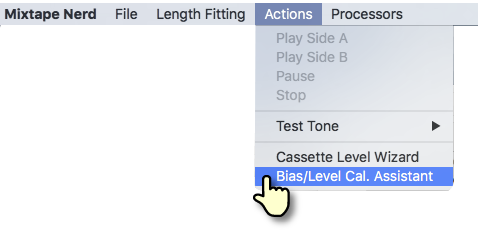
To start, please open the menu item "Mixtape Nerd" > "Actions" > "Bias/Level Cal. Assistant"
    
 
Enable Audio Input
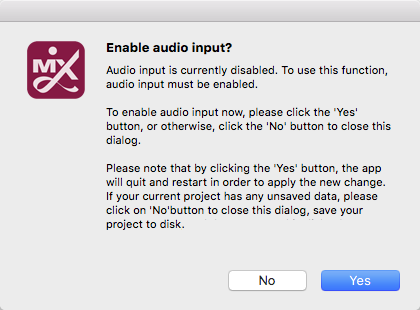
This feature requires the computer's audio input to be enabled. If it's not detected, a prompt will appear:
         
Alternatively, audio input can be toggled by using the menu item "Mixtape Nerd" > "Allow Audio Input". The change will be remembered across launch sessions. When this function is no longer needed, please disable the audio input as it will keep the app a little bit busier.
 
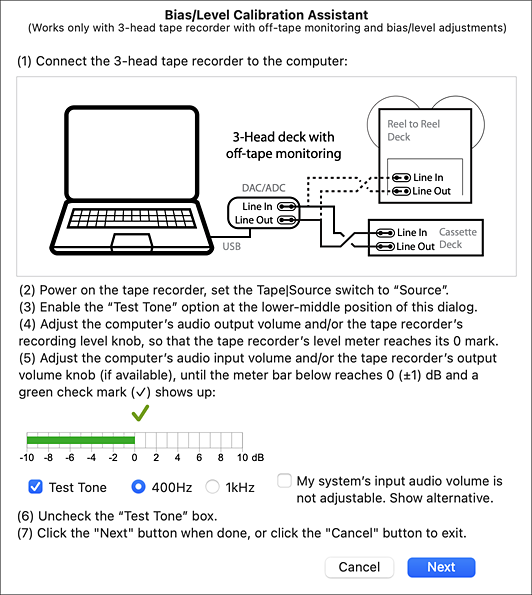
Audio Input Calibration
This step ensures that the computer receives audio signal at a proper level from the tape recorder. The procedures are detailed on the dialog itself:
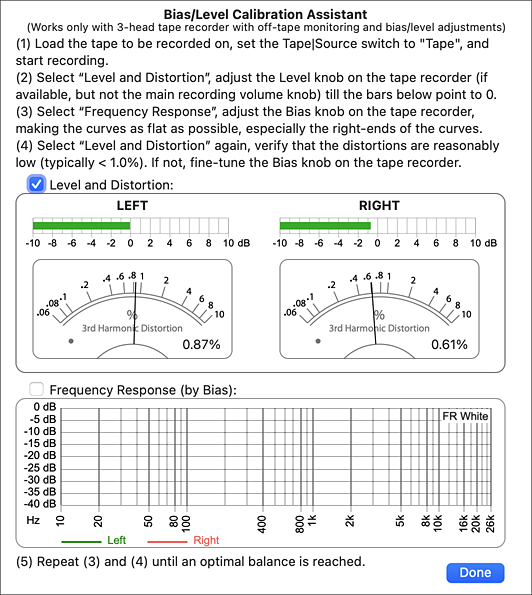


Bias/Level Calibration

As bias and level (aka: sensitivity) are corelated in tape recording, finding the optimal parameters requires trial-and-error iterations. The procedures are detailed on the dialog itself: